Kids360: Getting adopted globally

Key takeaways
- The app collects and shares more data than disclosed, contradicting its privacy policy and Google Play Store description. Event data is being sent to Facebook and AppsFlyer.
- The signup and authentication had security issues, enabling us to exploit the full functionality of the application. The extraction of child information, ranging from name and age to location, was possible.
- Long-term access to the data was possible due to the persistent nature of the keys.
Most parents install a parental control app and hand their child a phone, confident that they are in control. What they don't know is that in doing so, they may have handed that same control to a stranger.
We investigated the parental control app Kids360 by ANKO Solutions LLC as part of a research project, interested in the handling of sensitive data regarding children. The app enables parents to restrict, direct and block their child's mobile usage, as well as track their location. Due to insecure management of signup and authentication processes, it was possible to gain access to sensitive information and locate children around the world. This security issue affected both iOS and Android.
Our work has received coverage by Die Zeit (German).
Motivation
Parental control apps like Kids360 inherently require broad permission sets to access the data requested by the parent. This ranges from location to browsing history data, requiring a variety of runtime permissions. Parents are not only able to request information about the current status of the phone but can also restrict usage and block the installation of applications. The real concern is not just the capabilities themselves, but that all this sensitive data has to leave the device at some point, passing through external servers that now know a child is on the other end.
Introduction
Kids360 is a popular parental control app, with over 10M downloads of the parent app and over 1M for the kids counterpart. This broad reach makes it a viable target for extracting extremely personal information from a large audience. The app requires a variety of permission sets, including runtime permissions tied to functionalities that are responsible for collecting data. This information is shared with the parent's mobile. Having such powerful and shareable functionality creates two important points of interest from an attacker's perspective:
- Interaction with the child data related endpoints
- Interaction with the service distributing the information
To understand the following exploit, we first need to look at how the app works in general.
The app comes in two parts. The parent installs the parent app on their mobile, accepts the necessary agreements, and is then encouraged to install the child version on the child's device. During setup on the child's phone, several permissions need to be accepted, including creating a pin code that requires the BIND_DEVICE_ADMIN permission. This pin prevents the child from uninstalling the app. Afterwards, the child is prompted to start the signup process. This flow links the parent and child devices as a family unit and can be done in two ways: either by sending a link to the child via a messenger app, or more conveniently, by entering a 6-digit pin displayed on the parent's phone.
This signup method points to a potential entrance for an attacker. As it turns out, the initial signup process heavily relies on this 6-digit pin, which is reserved for a family for one hour. Even with rate limiting in place, this is enumerable: with 1 attempt per 1.2 seconds, this leads to 0.833 attempts per IP address per second. For 60 minutes we manage to achieve 50 attempts per minute, therefore we target 0.3%, 3000 attempts. Applying this logic in addition to IP rotation, we could enumerate a large portion of the given digits, only having to hit an active time window once to gain access to a family.
Findings
As an attack vector, we focused on extracting and altering information regarding the child. The findings are separated into two parts:
- relates to information privacy
- regards the application exploit
The tested applications included two Android apps, Kids360: Parental Control App (v2.41.0) and Alli360 by Kids360 (v2.38.1), as well as the iOS version of Kids360 (v1.82.7). Testing was conducted on two devices, a Google Pixel 7a and a Google Pixel 6a, both running Android 16 and rooted.
Information privacy
The application vendor claims on the Google Play Store not to send data to third parties regarding the parent application, although during our investigation it became evident that third parties are involved. Further, we were interested in whether there are unrelated third parties that profit from the child and parent data. The following evidence is not complete, due to us not putting the primary focus on external data aggregation.
Evidence of data collection
AppsFlyer SDK Tracks which marketing campaigns drive app installs and user actions. Present in both parent and child application.
Facebook Analytics SDK Sends data to Facebook. Can tie a child's app usage to a Facebook profile (parent's or family's).
ADIDManager + Device UUID Two internal IDs, as well as other mobile-related information, e.g. cell network information (CellInfo).
RemoteConfigRepo (Firebase) Theoretically, Remote Config could enable tracking functionality already present in the binary but disabled at review time, allowing post-approval activation that static review wouldn't catch
Own Analytics (
api.kids360.app) Developer-controlled server. Collects your Google Ad ID directly.
As part of assessing information privacy, it is also important to examine the permission sets the application requests or intends to use. This helps reveal how the app generally handles user privacy. The following permissions are part of the child mobile.
Permissions
Mandatory permissions required on installation (child device)
SYSTEM_ALERT_WINDOW: allows drawing over other apps- Notification-related permissions
- Background execution: app must run persistently in the background
- Geolocation-related permissions
- Physical activity-related permissions
Additional permissions the app may request
QUERY_ALL_PACKAGES: access to the full list of installed appsRECORD_AUDIO: microphone accessRECEIVE_BOOT_COMPLETED: auto-start on device bootREAD_EXTERNAL_STORAGE: read access to device storageWRITE_EXTERNAL_STORAGE: write access to device storage
Application exploit
During our investigation it became evident that the authentication might be faulty, leading to multiple possible attack paths. After the initial setup of the application, we wanted to take a quick look at how the signup is being handled given the 6-digit entry and reconstructed the family binding call. After realizing that this is the only hurdle to join families, we took a deeper dive to see whether this was exploitable further. The app showed several more vulnerabilities tied to authentication and overly verbose endpoints, leading to the extraction of sensitive family data. The research was conducted with a variety of tools, primarily using JADX and Frida, with Burp Suite and Ghidra also making an appearance.
Extracted user data
The following personal information about the user could be extracted during the investigation:
- Mobile version
- Language
- Age
- Timezone / City
- Schedules
- Tasks
- Installed applications
- App usage statistics
- Location
During our research we saw data from following countries.
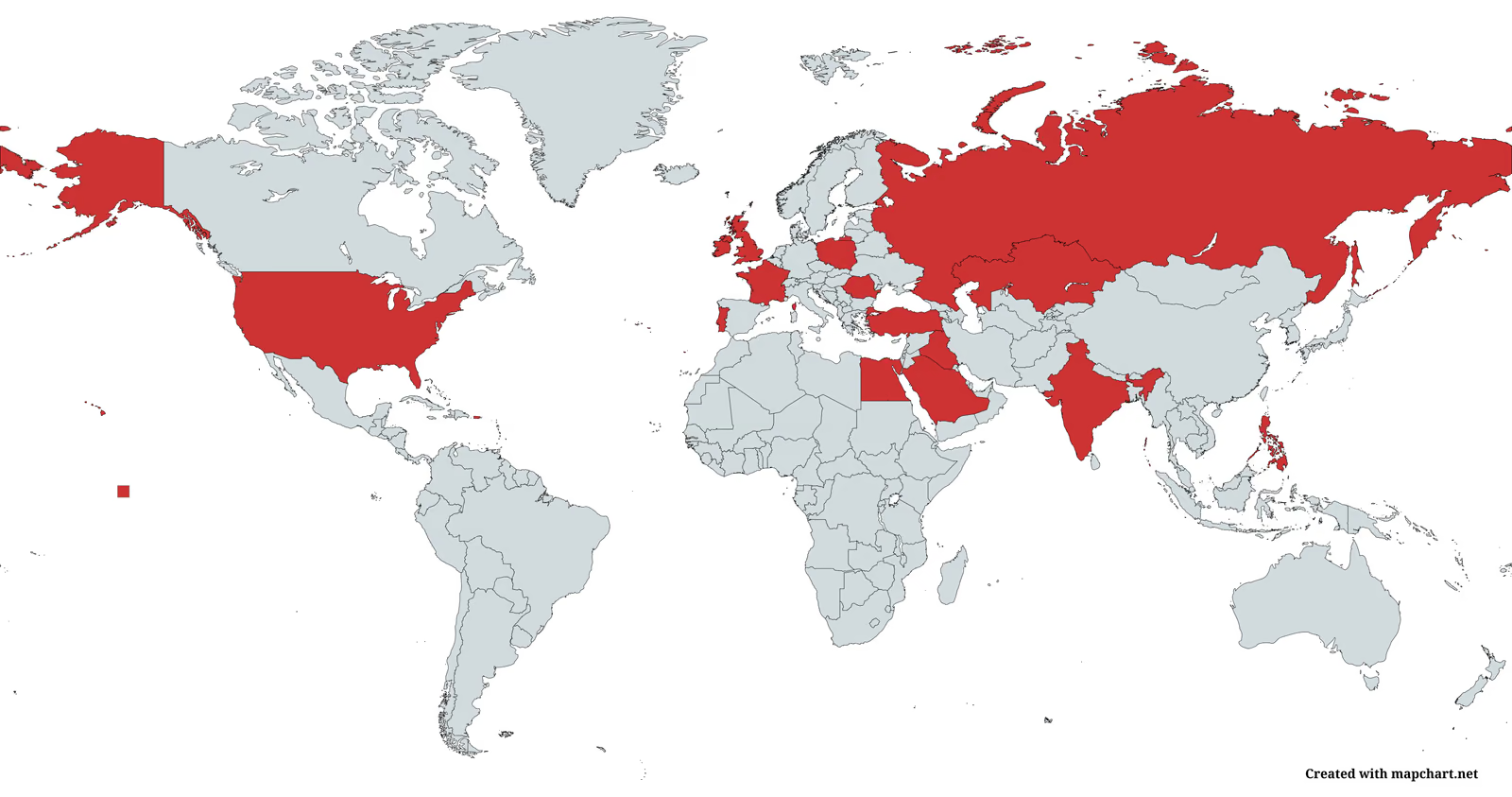
Note that we never modified any real user account information (children or parents). While we were working with the data, we anonymized the data set, and destroyed it after our threat evaluation.
Key components needed
Overall there are three key components at play. The UUID of the parent, a geo-token to interact with an external geo-service and the connected geo-room ID. In the following we will explain how we got hold of these.
A randomly generated UUID as the primary authentication mechanism
The application needs a mechanism to authenticate a user and determine whether they are part of a family group. This grouping is handled during the signup process, where the UUID of each participating party is stored externally. The UUID is a standard randomly generated 16-byte value, created with java.util.UUID.randomUUID(). Once assigned to a family, this UUID becomes part of the family group. The newly grouped user has different access rights for requesting data from Kids360 API endpoints depending on their registered status, either as a parent or as a child. Notably, all further authentication is handled using this UUID as the primary static token. This means that as a parent, all requests to retrieve information about the app status or the child are authenticated solely by the UUID.
The second token needed is the geo-token, a JWT. This is used when requesting the child's current position, which is handled by an outsourced service called "findmykids". The geoapi.findmykids.org endpoint belongs to a different company, LETEM LTD, as a subdomain of findmykids.org, which provides the geolocation of the children. The geo-token is generated by a specific endpoint of the geo-service. The token material consists of the UUID and the application fingerprint, a SHA-1, which is gzipped and placed into a custom JSON format before being sent to the server. These values do not change often, if at all, allowing an attacker to create a lasting JWT. By contacting the endpoint with the found credentials the response contains the long-lived token, which can then be used to request geolocation data, provided some additional information is known, which will be discussed below.
Adding and removing ourselves from families
As already hinted at in the signup section, it is possible to add oneself to families that are in the process of signing up. We send a request in the required format with a fake UUID. Once added to a family as a child, we can use this access to request information about the family via API endpoints, specifically /v3/devices. This returns an overview of active and inactive devices in the family group we joined. Since authentication relies on the UUID, we can extract the parent UUID and reconstruct various API calls to extend our functionality and control over the child's device. We can then immediately remove ourselves from the family group to avoid raising suspicion, since we already have the token needed for permanent access to the family.
Tracking children
With the parent token in hand, we can construct the JSON body to send to the geo API and receive an active geo-token. Since the application fingerprint and UUID do not change, we can combine both and send them directly to the server. This works for both Android and iOS. As a next step, families are assigned to geo-rooms identified by an 8-digit ID. Enumerating this for every family is not practical, so we need another way to obtain this information. The initial geolocation endpoint readily returns the actual room ID when provided with parameters outside the valid time interval range. Later in our investigation, we found another endpoint that directly returned the currently active room. The location data we accessed appeared to be detailed enough that even minor location changes, potentially on the order of a meter or less, did not go unnoticed in the data stream. That said, any such interpretation would need to account for potential interference or processing artifacts that could distort the actual position.
Expanding the functionality
With the parent UUID, the geo-token and the room ID we have the full capabilities of a parent account. It didn't stop at location. We could assign tasks, block apps, restrict the phone entirely. We could even change the removal pin, meaning the child's phone was now, for all practical purposes, ours. All of this is due to overly verbose endpoints and missing or reconstructable authentication, ultimately leading to a complete takeover of the family account.
Conclusion and contact
Using parental control apps means giving up sensitive information, not only about yourself but also about others, in this case children. Anyone considering sharing data about children, which may travel across borders, may reside on external servers and may give third parties partial control over a child's device, should carefully think about the risk and the agenda of people having access to this information.
As mitigation strategies we propose a secure QR code-based binding mechanism with an authentication as well as authorization flow based on non-static, per-session parameters, which should be part of the existing tokens. Defense in depth is key, making role-based server-side authorization vital. Moreover, key material should be stored in a secure fashion, e.g. the Android Keystore. Furthermore, we encourage restricting the API responses to only necessary data with adequate error handling and input validation.
Somewhere out there, a parent opened the Kids360 app this morning, checked in on their child, and felt reassured. They had no idea that for a window of time, someone else could have been watching too.
We disclosed these findings to the affected organization promptly. The full disclosure timeline is provided below.
- 13.03.2026: Discovery of authentication issues
- 16.03.2026: Created write-up and PoC
- 16.04.2026: Responsible disclosure to vendor
- 11.05.2026: Vendor acknowledged receiving the write-up
- 12.05.2026: Vendor acknowledged findings, scheduled fixes until June 16th
- 16.06.2026: Vendor has not updated SRLabs regarding fixes. During a follow up test, it became evident that only minor changes had been applied, rendering the application still exploitable
The issues described in this post have not been remediated to date.
Credits I would like to thank Stephan and Louis, for reviewing and supporting me during my research, and Matthias for helping and guiding me during the responsible disclosure.